Keep your app code untouched
Injects via DYLD_INSERT_LIBRARIES and emulates AVFoundation directly. No #if targetEnvironment(simulator) hacks, no wrapper SDKs, no dependencies.
SimCam Lite 0.2.5 · Open source · MIT
Stream a photo, looping 4K video, QR code, or your Mac’s webcam into any Simulator app—with zero changes to your app’s code.
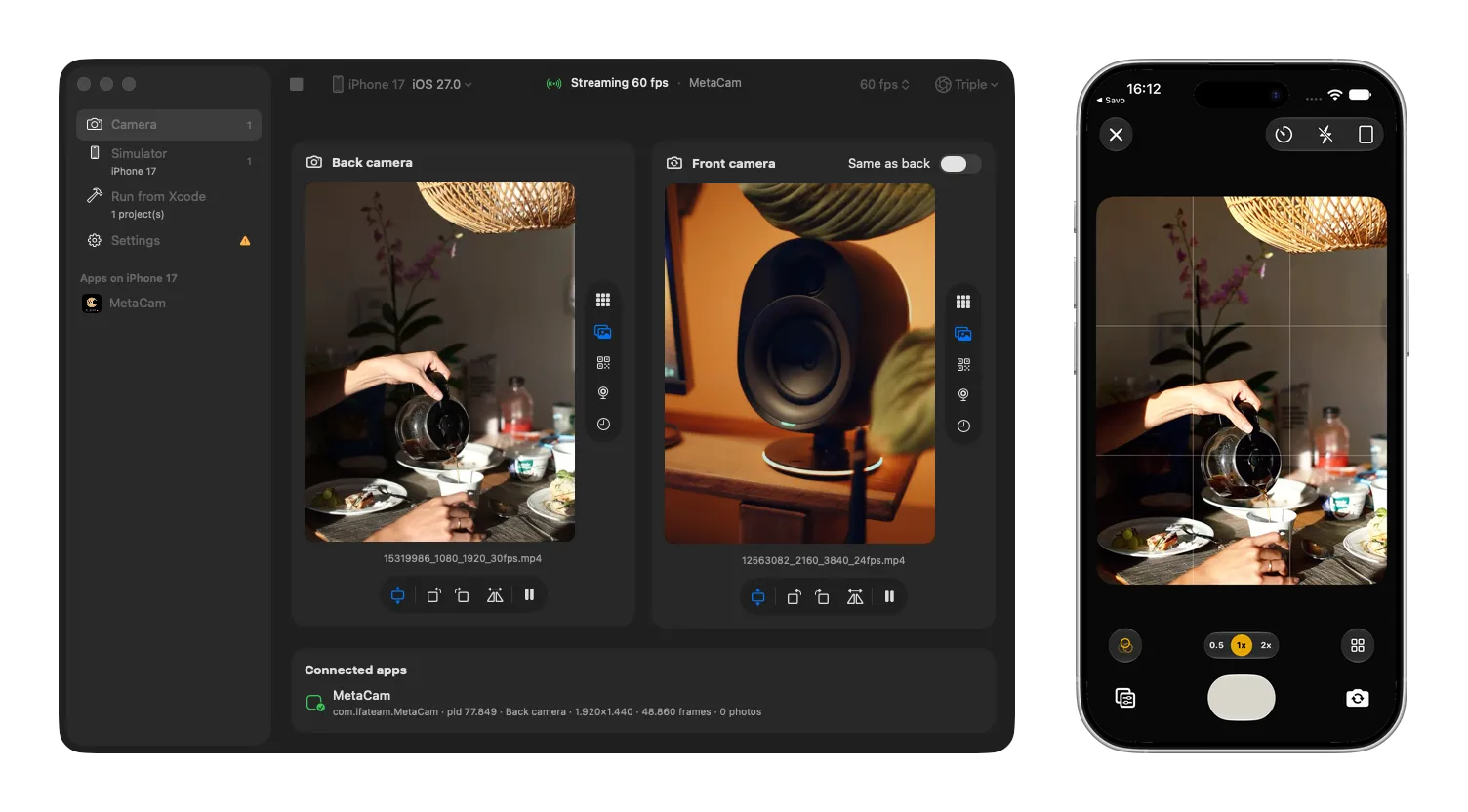
Injects via DYLD_INSERT_LIBRARIES and emulates AVFoundation directly. No #if targetEnvironment(simulator) hacks, no wrapper SDKs, no dependencies.
No per-seat commercial licenses or paywalls. Built for solo developers, QA engineers, designers, and CI runners.
Set up an Xcode project once to keep using the Run button and LLDB breakpoints, or drive every source and permission preset from simcam.
Built for fast iteration in SwiftUI, UIKit, AVFoundation, and Vision without reaching for a physical iPhone.
Feed a still photo, a looping video up to 4K, a generated QR code (remembers your 8 most recent codes and pre-fills from clipboard), your Mac’s live webcam, or a built-in test pattern.
Includes: Photos, 4K video loop, QR generator, Mac webcam, drag & drop.
Assign separate sources to the back and front cameras—or toggle “Same as back” to mirror one feed. Adjust fill vs. fit, rotate in 90° steps, mirror, and pause video on any frame.
Includes: Same as back, fit/fill, 90° rotation, mirror, frame-exact pause.
Emulate Triple (0.5× · 1× · 3×), Dual Wide, or Single camera devices at 30 or 60 fps. Video frames, still photo captures, preview layers, and device rotation follow real hardware.
Includes: Triple, Dual Wide, Single profiles, 30/60 fps, rotation coordinator.
Switch between Ask and Allow modes, or jump to 5 deterministic TCC presets to test onboarding and denied states. Streams 48 kHz mono 16-bit PCM audio via AVCaptureAudioDataOutput.
Includes: fresh, camera-denied, mic-not-asked, mic-denied, allowed, 48 kHz PCM.
Turn injection on for every app on a simulator (automatically restored when that simulator reboots), enable Inject into Every Simulator as devices boot, or launch a single app directly.
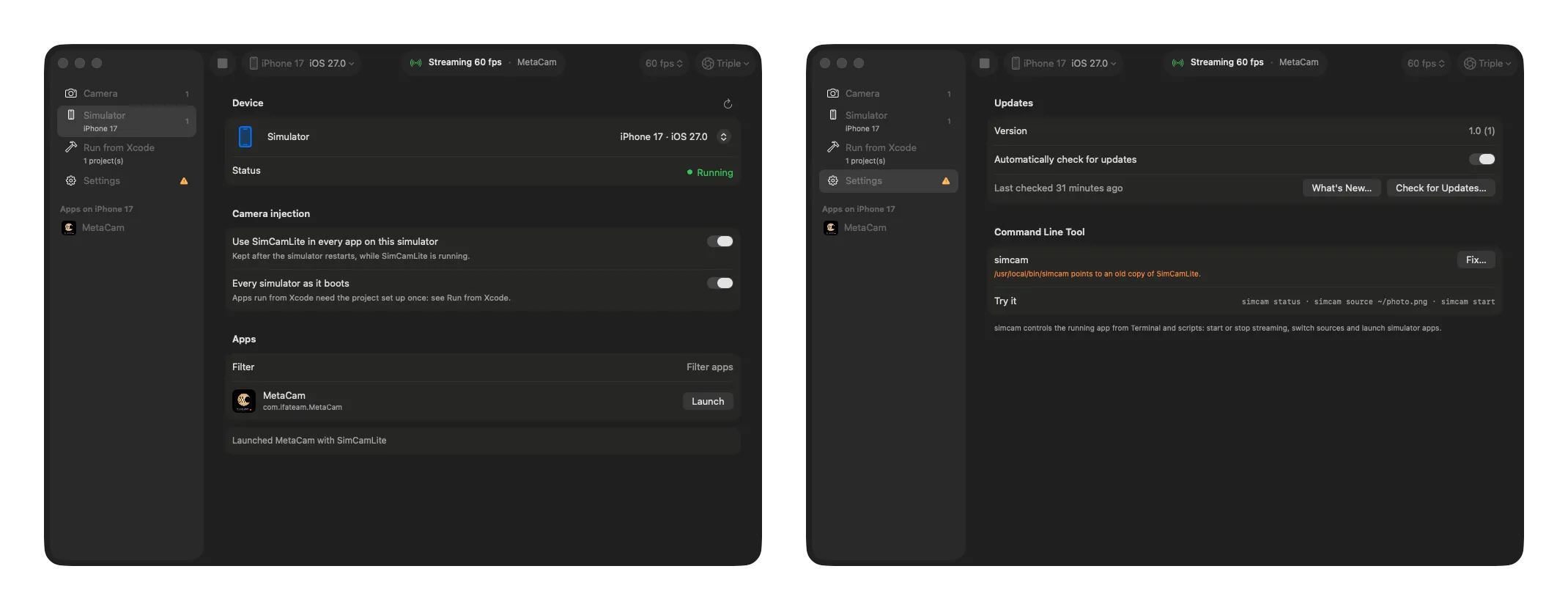
Every control in SimCam Lite has a matching simcam command. Both the macOS window and Terminal talk to the same state over a local Unix socket—so UI tests, CI scripts, and AI coding agents always get reproducible frames.
--json on status, cameras, devices, and apps.simcam --generate-completion-script zsh.# Use a still photo or looping 4K video as the back camera
simcam source ~/Pictures/receipt.jpg
# Generate and stream a QR code from any link or payload
simcam source qr "https://simcamlite.ifateam.dev"
# Use your Mac's FaceTime camera for the front camera
simcam source --front camera --device "FaceTime"
# Fit, rotate, mirror, or pause a video on an exact frame
simcam adjust --fit --rotate 90 --mirror
simcam pause# Boot an iPhone simulator with camera injection enabled
simcam boot "iPhone 17 Pro" --inject --wait
# List installed apps and launch one with SimCam Lite injected
simcam apps
simcam launch com.example.scanner
# Enable injection for every simulator as it boots
simcam inject auto on
# Machine-readable status for scripts and AI agents
simcam status --json# Let injected apps prompt for camera access like a real device
simcam permission ask
# Restart an app with a deterministic TCC permission preset
simcam permission com.example.app fresh
simcam permission com.example.app camera-denied
simcam permission com.example.app allowed
# Configure framerate & camera hardware profile
simcam fps 60
simcam profile triple# Inject SimCamLiteLoader into iOS app schemes in the current repo
simcam xcode setup
# Inspect which schemes are enabled (macOS/Catalyst are skipped safely)
simcam xcode status
# Revert scheme changes cleanly
simcam xcode removeMIT licensed open source. Requires macOS 14.0 (Sonoma) or newer and Xcode with an iOS Simulator runtime.
Installs SimCamLite.app into Applications and puts simcam on your PATH. Self-updates via Sparkle.
brew install --cask huyhunhngc/tap/simcam-lite
Download SimCamLite-0.2.5.dmg, drag to Applications, and open it. Includes one-click CLI PATH installation inside Settings.
Requires Xcode 26+, XcodeGen, and your team ID in Config/Environment.xcconfig.
brew install xcodegen
git clone https://github.com/huyhunhngc/SimCamLite.git
cd SimCamLite && scripts/build.sh DebugAnswers to the most common questions. Looking for low-level internals? Read the architecture docs →
No. SimCam Lite never touches your app’s source code or dependencies. It injects a small loader via DYLD_INSERT_LIBRARIES that loads SimCamLiteInject.framework into Simulator user apps and emulates AVFoundation.
Yes. Because Xcode sets its own DYLD_INSERT_LIBRARIES (for Main Thread Checker and diagnostics), open “Run from Xcode” in SimCam Lite—or run `simcam xcode setup`—once per project. Committing the shared scheme change is safe: Macs without SimCam Lite ignore the missing dylib.
SimCam Lite requires macOS 14.0 (Sonoma) or newer and Xcode with an iOS Simulator runtime (targeting iOS 16.0+ simulator apps).
Yes—any app or library reading frames from AVCaptureVideoDataOutput, AVCapturePhotoOutput, or AVCaptureVideoPreviewLayer (including Vision, VisionKit data scanners on video frames, React Native, and Flutter camera plugins) receives the live feed. Note that AVFoundation’s built-in AVCaptureMetadataOutput QR detection is not emulated yet.
SimCam Lite does not yet support movie file recording (AVCaptureMovieFileOutput), built-in AVCaptureMetadataOutput detection, or multi-camera sessions (AVCaptureMultiCamSession). Audio input via AVCaptureAudioDataOutput (48 kHz mono 16-bit PCM) is supported.
Yes. SimCam Lite is 100% free and MIT-licensed open source. There are no seat limits, watermarks, or commercial CI add-ons.